



作者:Nigel Bayliss
SQL Plan Management(SPM)被設計用于預防應用中使用的SQL(假設問題SQL會被使用超過1次)發生性能退化。SPM使用與單個SQL相關聯的SQL plan baselines來控制哪些執行計劃是允許使用的。這是一個簡單但功能強大的想法,它為以更多選擇性和應對方法來使用SQL plan baselines的可能性,打開了一扇大門:在不修改應用查詢或者不改變應用本身的情況下,影響單個查詢的執行計劃。在博客集(點此鏈接)和SPM白頁(點此鏈接)中涵蓋了相關技術介紹,但是,用一個完整示例來展示它,還是值得的 。
如果您不想閱讀下面的所有背景并跳轉到一個真實的例子,我已經在GitHub中添加了一些新的腳本(點此鏈接)。它們類似于Oracle支持部門幾年前發布的SQL概要文件示例,它們演示了如何從SQL調優集和AWR中檢索計劃。它們將在Oracle Database 12c Release 2以后的版本(甚至在Oracle Database 18c 標準版上)中工作。下面的另一個代碼示例則可以在Oracle Database 11g以后的版本中工作。
考慮這樣一個場景:一個應用程序使用了一個SQL語句,該應用程序有一個次優計劃,您需要對此做些什么。為了便于討論,我們假設您知道有一個提示可以用來實現一個更好的計劃。從現在開始,我假設您希望應用一個提示,但是應用程序代碼不能以任何方式更改。
請看下面的SQL執行計劃。這是一個使用索引篩選銷售記錄的應用程序查詢:
SQL> SELECT *
  2  FROM table(DBMS_XPLAN.DISPLAY_CURSOR(sql_id=>'f23qunrkxdgdt'));

PLAN_TABLE_OUTPUT
-----------------
SQL_ID  f23qunrkxdgdt, child number 2
-------------------------------------
select sum(num) from sales where id < :idv

Plan hash value: 2327341677
-------------------------------------------------------
| Id  | Operation                            | Name   |
-------------------------------------------------------
|   0 | SELECT STATEMENT                     |        |
|   1 |  SORT AGGREGATE                      |        |
|   2 |   TABLE ACCESS BY INDEX ROWID BATCHED| SALES  |
|*  3 |    INDEX RANGE SCAN                  | SALESI |
-------------------------------------------------------
如果這個計劃不是最優的呢?在這個案例中,它是最佳的,但是為了示例起見,我將假定我希望Oracle優化器選擇一個完整的表掃描。我們需要的是FULL的提示:
PLAN_TABLE_OUTPUT
-----------------
SQL_ID 82x4tj3z2vg23, child number 0
-------------------------------------
select /*+ FULL(sales) */ sum(num) from sales where id < :idv

Plan hash value: 1047182207
------------------------------------
| Id  | Operation          | Name  |
------------------------------------
|   0 | SELECT STATEMENT   |       |
|   1 |  SORT AGGREGATE    |       |
|*  2 |   TABLE ACCESS FULL| SALES |
------------------------------------
加了提示的測試查詢為我們提供了一個我們期望使用的,全表掃描的執行計劃的示例。現在我們可以使用SPM將我們的首選計劃與應用程序查詢相關聯。 步驟如下:
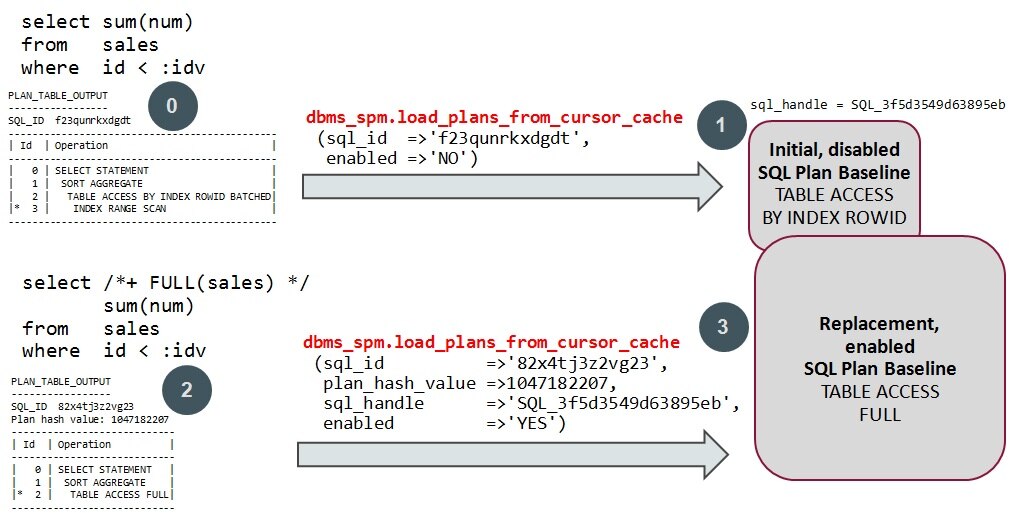
步驟0確認我們有一個SQL語句,其中包含一個要更改的計劃。其余步驟包括:
-
為應用程序查詢創建初始禁用的SQL計劃基線。我之所以使用術語“一個或多個”,是因為一個查詢可能有多個SQL執行計劃。我們將為SQL語句使用的每個計劃創建一個SQL計劃基線,但實際上只需要一個。
-
執行(或解析)有提示的測試查詢以生成首選計劃。
-
將在步驟2中創建的首選計劃加載到SQL計劃基線中(這次啟用了enabled=‘YES’)。
有提示的語句的文本顯然和應用的語句的文本是不同的,但這正好:我們可以簡單地使用執行計劃而不是SQL文本。只要執行計劃可以重新產生并且是有效,我們的應用查詢就會使用。我這么說是什么意思?請看下面的示例:
假設一個對CUSTOMERS的查詢發生了全表掃描:
select sum(num) from CUSTOMERS;
如果我們使用這個查詢的計劃,嘗試去影響我們對SALES的查詢,這是不能正常工作的。這就像下面這樣,來要求SQL plan baseline去影響對SALES的執行計劃:
select /*+ FULL(customers) */ sum(num) from SALES where id < :idv
表象背后,是SQL plan baselines使用一套完整的提示來控制執行計劃。因此,我們對SALES的查詢,FULL(customers)不是一個有效的提示,并且不會產生期望的結果!如果您有時間,可以嘗試將對CUSTOMERS查詢的計劃加載到與對SALES查詢關聯的SQL計劃基線中。不會有錯誤消息,但您也無法產生您想要的計劃(除非只是運氣使然)。
工作示例
我已經上傳了一個示例過程(點此鏈接)和一個完整的示例到GitHub(點此鏈接),這樣您就可以看到上面的步驟是如何實現的。根據下面的評論,我也添加了這個過程。它以禁用狀態加載所有現有的執行計劃,并添加一個新的啟用的執行計劃到SQL plan baseline(而不是替換現有的)中。你應該調整程序以適合你的具體要求。例如,您可能不希望刪除預先存在的SQL計劃基線。
我將使用上面顯示的sqlid和plan hash值。演示如何使用我的示例過程set_my_plan和add_my_plan(請參閱GitHub中的proc.sql和proc2.sql):
Set my plan procedure
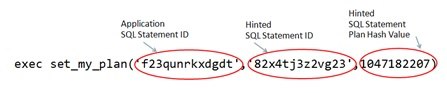
執行Procedure
注:“SPB"表示Sql Plan Baseline
SQL> set serveroutput on
SQL> set linesize 200
SQL> exec set_my_plan('f23qunrkxdgdt','82x4tj3z2vg23',1047182207)
No existing SQL plan baselines to drop
Created 1 disabled SPBs for SQLID f23qunrkxdgdt
SPB Detail: SQL_PLAN_3yr9p97b3j5gbfaa7aab3 handle SQL_3f5d3549d63895eb
Associating plan SQLID/PHV 82x4tj3z2vg23/1047182207 with SPB SQL Handle SQL_3f5d3549d63895eb
Enabled SPB - Name: SQL_PLAN_3yr9p97b3j5gb35032dee SQL handle: SQL_3f5d3549d63895eb
SQL> set serveroutput off
下面是procedure執行后,對應用查詢所做的EXPLAIN PLAN的輸出。未加HINT的SQL語句現在使用了全表掃描,并且,你可以從NOTE部分,看到SQL plan baseline已被使用的注釋.
SQL> SELECT *
  2  FROM table(DBMS_XPLAN.DISPLAY_CURSOR(FORMAT=>'LAST'));

PLAN_TABLE_OUTPUT
-----------------
SQL_ID  f23qunrkxdgdt, child number 0
-------------------------------------
select sum(num) from sales where id < :idv

Plan hash value: 1047182207
------------------------------------
| Id  | Operation          | Name  |
------------------------------------
|   0 | SELECT STATEMENT   |       |
|   1 |  SORT AGGREGATE    |       |
|*  2 |   TABLE ACCESS FULL| SALES |
------------------------------------

Predicate Information (identified by operation id):
---------------------------------------------------
   2 - filter("ID"<:IDV)

Note
-----
   - SQL plan baseline SQL_PLAN_3yr9p97b3j5gb35032dee used for this statement
注意事項
SPM使用簽名來匹配SQL語句,而不是SQL_ID。簽名產生自規范化后的SQL文本。因此,如果有多個SQL ID具有相同的簽名,那么它們將共享相同的SQL計劃基線。例如,以下查詢具有相同的簽名:
select sum(num) from sales where id < :idv
SELECT SUM(num) FROM sales WHERE id < :idv
select      sum(num) from sales where id < :idv
上面的演示procedure會刪除與應用SQL語句擁有相同簽名的,已存在的SQL plan baseline.而新的腳本(點此鏈接)在發現有存在的SQL plan baseline時會報錯,除非你使用了FORCE參數。
一如既往,歡迎評論和更正。只需在底部發表評論
譯者注: 若希望更進一步了解SPM,請點此鏈接http://m.sunline.cc/db/29991
原文鏈接:https://blogs.oracle.com/optimizer/using-sql-plan-management-to-control-sql-execution-plans
原文內容:
Using SQL Plan Management to Control SQL Execution Plans
Nigel Bayliss
Product Manager
SQL plan management (SPM) is designed to prevent performance regression for all SQL statements used by an application (assuming that the SQL statements in question are used more than once). SPM uses SQL plan baselines that are associated with individual SQL statements to control what execution plans they are permitted to use. It’s a simple but powerful idea that opens the door to the possibility of using SQL plan baselines in a more selective and reactive way: to influence the SQL execution plans of individual queries without having to modify application queries or change the application itself. The technique is covered in blogs and in the SPM white paper here, but it deserves a post of its own along with a full example.
If you want to avoid reading all the background below and jump to a real example, I’ve added some new scripts to GitHub. They are similar to SQL profile examples published by Oracle Support some years ago and they demonstrate how you can retrieve plans from SQL tuning sets and AWR. They will work in Oracle Database 12c Release 2 onwards (and even on Oracle Database 18c Standard Edition). The other code example below will work in Oracle Database 11g onwards.
Consider the scenario where you have a SQL statement used by an application that’s got a sub-optimal plan and you need to do something about it. For the sake of argument, let’s assume that you know that there’s a hint you can use to achieve a better plan. I’m going to assume from now on that you want to apply a hint but the application code cannot be changed in any way.
Take a look at the following SQL execution plan. It’s an application query that filters SALES rows using an index:
SQL> SELECT *
  2  FROM table(DBMS_XPLAN.DISPLAY_CURSOR(sql_id=>'f23qunrkxdgdt'));

PLAN_TABLE_OUTPUT
-----------------
SQL_ID  f23qunrkxdgdt, child number 2
-------------------------------------
select sum(num) from sales where id < :idv

Plan hash value: 2327341677
-------------------------------------------------------
| Id  | Operation                            | Name   |
-------------------------------------------------------
|   0 | SELECT STATEMENT                     |        |
|   1 |  SORT AGGREGATE                      |        |
|   2 |   TABLE ACCESS BY INDEX ROWID BATCHED| SALES  |
|*  3 |    INDEX RANGE SCAN                  | SALESI |
-------------------------------------------------------
What if this plan isn’t optimal? It is optimal in this case, but for the sake of example I’m going to assume that I want the Oracle Optimizer to pick a full table scan instead. All we need is the FULL hint:
PLAN_TABLE_OUTPUT
-----------------
SQL_ID  82x4tj3z2vg23, child number 0
-------------------------------------
select /*+ FULL(sales) */ sum(num) from sales where id < :idv

Plan hash value: 1047182207
------------------------------------
| Id  | Operation          | Name  |
------------------------------------
|   0 | SELECT STATEMENT   |       |
|   1 |  SORT AGGREGATE    |       |
|*  2 |   TABLE ACCESS FULL| SALES |
------------------------------------
The hinted test query gives us an example of the TABLE ACCESS FULL plan we want to use. At this point we are in a position to use SPM to associate our preferred plan with the application query. Here are the steps:
Controlling plans with SQL plan management
Step zero acknowledges that we have a SQL statement with a plan we want to change. The remaining steps are:
Create an initial disabled SQL plan baselines for the application query. I’m using the term “one or more” because a query might have more than one SQL execution plan.  We will create a SQL plan baseline for each plan used by the SQL statement, but only one is actually needed.
Execute (or parse) a hinted test query to generate the preferred plan.
Load the preferred plan into a SQL plan baseline created in step two (this time with enabled=’YES’).
The hinted statement’s text is of course different to the application statement’s text, but that’s just fine: we’re simply using the plan and not the SQL text. Our application query will use the plan as long as it can reproduce it and it’s valid. What do I mean by that? Here’s an example:
Imagine a CUSTOMERS query that happens to perform a FULL scan:
select sum(num) from CUSTOMERS;
If we use the plan for this query in an attempt to influence our SALES query, it’s not going to work. We would be asking the SQL plan baseline to influence the SALES plan like this:
select /*+ FULL(customers) */ sum(num) from SALES where id < :idv
Under the covers, SQL plan baselines use a complete set of hints to control execution plans. So, for our SALES query, FULL(customers) is not a valid hint and is not going to yield the desired result! If you’ve got some time on your hands, you can try loading a plan for a CUSTOMERS query into a SQL plan baseline associated with a SALES query. There won’t be an error message, but you won’t be able to reproduce the plan you want either (unless it’s just by luck).
Worked Example
I’ve have uploaded an example procedure and a fully worked example to GitHub so you can see how the steps above can be implemented. Based on a comment below, I added this procedure too. It loads all existing plans in a disabled state and adds a new enabled SQL plan baseline (rather than replacing an existing one). You should adapt the procedures to meet your specific requirements. For example, you might not want to drop pre-existing SQL plan baselines.
I’ll be using the SQL IDs and plan hash value that I highlighted in bold, above. Here’s how to use my example procedures set_my_plan and add_my_plan (see proc.sql and proc2.sql in GitHub):
Set my plan procedure
Executing the Procedures
Note that “SPB” stands for SQL plan baseline:
SQL> set serveroutput on
SQL> set linesize 200
SQL> exec set_my_plan('f23qunrkxdgdt','82x4tj3z2vg23',1047182207)
No existing SQL plan baselines to drop
Created 1 disabled SPBs for SQLID f23qunrkxdgdt
SPB Detail: SQL_PLAN_3yr9p97b3j5gbfaa7aab3 handle SQL_3f5d3549d63895eb
Associating plan SQLID/PHV 82x4tj3z2vg23/1047182207 with SPB SQL Handle SQL_3f5d3549d63895eb
Enabled SPB - Name: SQL_PLAN_3yr9p97b3j5gb35032dee SQL handle: SQL_3f5d3549d63895eb
SQL> set serveroutput off
Here’s the explain plan for the application query after the procedure was executed. The non-hinted SQL statement now uses the FULL scan and you can see from the Note section that the SQL plan baseline is being used.
SQL> SELECT *
  2  FROM table(DBMS_XPLAN.DISPLAY_CURSOR(FORMAT=>'LAST'));

PLAN_TABLE_OUTPUT
-----------------
SQL_ID  f23qunrkxdgdt, child number 0
-------------------------------------
select sum(num) from sales where id < :idv

Plan hash value: 1047182207
------------------------------------
| Id  | Operation          | Name  |
------------------------------------
|   0 | SELECT STATEMENT   |       |
|   1 |  SORT AGGREGATE    |       |
|*  2 |   TABLE ACCESS FULL| SALES |
------------------------------------

Predicate Information (identified by operation id):
---------------------------------------------------
   2 - filter("ID"<:IDV)

Note
-----
   - SQL plan baseline SQL_PLAN_3yr9p97b3j5gb35032dee used for this statement
Usage Notes
SPM matches a SQL statement using a signature, not a SQL ID. The signature is generated from the normalized SQL text. For this reason, if there are multiple SQL IDs that have the same signature then they will all share the same SQL plan baseline. For example, the following queries have the same signature:
select sum(num) from sales where id < :idv
SELECT SUM(num) FROM sales WHERE id < :idv
select      sum(num) from sales where id < :idv
The example procedures (above) will drop any pre-existing SQL plan baselines for SQL statements that have the same signature as the application SQL statement. The newer scripts will generate an error if there are existing SQL plan baselines unless you use the FORCE parameter.
As always, comments and corrections are welcome. Just post a comment at the bottom.
