



一、故障現(xiàn)象:
告警日志:
Sun Feb 09 14:18:42 2020
Auto-tuning: Shutting down background process GTX2
Sun Feb 09 15:06:00 2020
NOTE: ASMB terminating
Errors in file /opt/oracle/app/diag/rdbms/xxxx/xxxx1/trace/xxxx1_asmb_7463.trc:
ORA-15064: communication failure with ASM instance
ORA-03113: end-of-file on communication channel
Process ID:
Session ID: 68 Serial number: 5
Errors in file /opt/oracle/app/diag/rdbms/xxxx/xxxx1/trace/xxxx1_asmb_7463.trc:
Errors in file /opt/oracle/app/diag/rdbms/xxxx/xxxx1/trace/xxxx1_asmb_7463.trc:
ORA-15064: communication failure with ASM instance
ORA-03113: end-of-file on communication channel
Process ID:
Session ID: 68 Serial number: 5
ASMB (ospid: 7463): terminating the instance due to error 15064
Termination issued to instance processes. Waiting for the processes to exit
Sun Feb 09 15:06:11 2020
Instance termination failed to kill one or more processes
Instance terminated by ASMB, pid = 7463
Sun Feb 09 15:12:24 2020
Starting ORACLE instance (normal)
************************ Large Pages Information *******************
Per process system memlock (soft) limit = UNLIMITED

Total Shared Global Region in Large Pages = 0 KB (0%)

Large Pages used by this instance: 0 (0 KB)
Large Pages unused system wide = 0 (0 KB)
Large Pages configured system wide = 0 (0 KB)
Large Page size = 2048 KB

RECOMMENDATION:
 Total System Global Area size is 24 GB. For optimal performance,
 prior to the next instance restart:
 1. Increase the number of unused large pages by
at least 12289 (page size 2048 KB, total size 24 GB) system wide to
 get 100% of the System Global Area allocated with large pages
********************************************************************
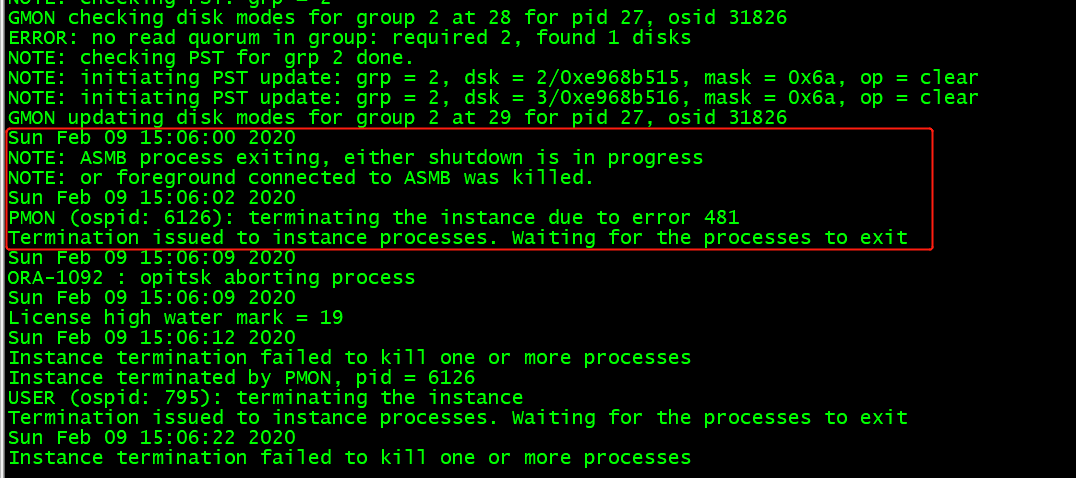
從數(shù)據(jù)庫告警日志可以發(fā)現(xiàn),核心進(jìn)程asmb 在2.9日15.06分 突然提示正在終止,隨后一節(jié)點(diǎn)數(shù)據(jù)庫報(bào)錯(cuò),不能與 ASM通信, 也就是連不上 ASM存儲(chǔ),檢查ASM告警日志發(fā)現(xiàn),核心進(jìn)程ASMB 在2.9日15.06分 被kill 掉,隨后一節(jié)點(diǎn)的ASM實(shí)例掛掉,導(dǎo)致一節(jié)點(diǎn)數(shù)據(jù)庫也緊跟著掛掉
二、故障原因
從15:03開始

一節(jié)點(diǎn)開始報(bào) voting file所在的磁盤,IO通信有超時(shí)的現(xiàn)象,磁盤hang住, 到15.05分開始 ocr_vote磁盤離線,一節(jié)點(diǎn)被剔出集群,

后續(xù)檢查主機(jī),發(fā)現(xiàn)主機(jī)重啟過,檢查操作系統(tǒng)日志,發(fā)現(xiàn)從15.02分開始,: INFO: task ocssd.bin:16080 blocked for more than 120 seconds. 有任務(wù)被hung 住,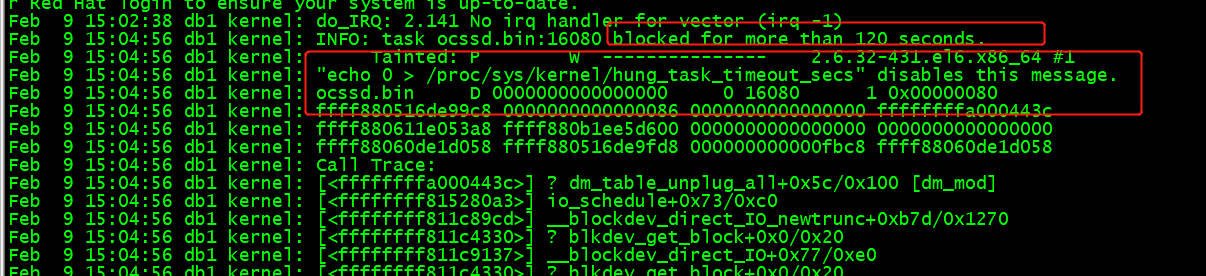
該錯(cuò)誤是由于IO子系統(tǒng)的處理速度不夠快,不能在120秒將緩存中的數(shù)據(jù)全部寫入磁盤。IO系統(tǒng)響應(yīng)緩慢,導(dǎo)致越來越多的請(qǐng)求堆積,最終IO 耗盡,系統(tǒng)內(nèi)存全部被占用,導(dǎo)致系統(tǒng)失去響應(yīng),發(fā)生故障。
三、故障解決
建議一:
可以調(diào)整 操作系統(tǒng)參數(shù),
vm.dirty_ratio=20
vm.dirty_background_ratio=3
目前操作系統(tǒng)配置文件/etc/sysctl.conf
中 沒有這兩個(gè)參數(shù) ,建議調(diào)整,sysctl -p 生效,(調(diào)整該操作系統(tǒng)參數(shù)不用重啟主機(jī))
vm.dirty_background_ratio 這個(gè)參數(shù)指定了當(dāng)文件系統(tǒng)緩存臟頁數(shù)量達(dá)到系統(tǒng)內(nèi)存百分之多少時(shí)(如5%)就會(huì)觸發(fā)pdflush/flush/kdmflush等后臺(tái) 回寫進(jìn)程運(yùn)行,將一定緩存的臟頁異步地刷入外存;
操作系統(tǒng)參數(shù)說明:
vm.dirty_ratio 這個(gè)參數(shù)則指定了當(dāng)文件系統(tǒng)緩存臟頁數(shù)量達(dá)到系統(tǒng)內(nèi)存百分之多少時(shí)(如10%),系統(tǒng)不得不開始處理緩存臟頁(因?yàn)榇藭r(shí)臟頁數(shù)量已經(jīng)比較多,為了避免數(shù)據(jù)丟失需要將一定臟頁刷入外存);在此過程中很多應(yīng)用進(jìn)程可能會(huì)因?yàn)橄到y(tǒng)轉(zhuǎn)而處理文件IO而阻塞。
建議二:
另外在檢查中,發(fā)現(xiàn)該主機(jī)未配置大頁,建議配置大頁,可以極大提升數(shù)據(jù)庫性能
后期調(diào)整后至今沒有發(fā)現(xiàn)主機(jī)重啟,故障解決。
