



OceanBase開源版V3.1.1壓力測試情況
1. 測試方案
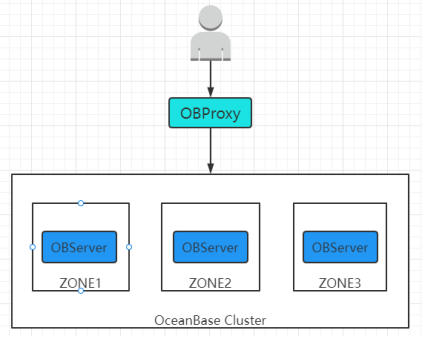
使用OBD部署OceanBase 數(shù)據(jù)庫,集群部署規(guī)模為1:1:1,OBProxy、OBClient以及TPC-C與TPC-H測試工具部署在另一臺服務(wù)器上, 作為客戶端的壓力測試服務(wù)器,分別進行TPC-C與TPC-H測試。測試集群拓?fù)涫疽鈭D如下:
2. 測試環(huán)境
2.1. 硬件配置
測試祼金屬服務(wù)器四臺,硬件配置如下:
| IP地址 | CPU | 內(nèi)存 | 硬盤 |
|---|---|---|---|
| 10.30.30.11 | Intel(R) Xeon(R) CPU E5-2640 v4 @ 2.40GHz 40核 | 256GB | 480GB SSD + 7*4TB SATA RAID5 |
| 10.30.30.12 | 256GB | ||
| 10.30.30.13 | 256GB | ||
| 10.30.10.27 | 128GB | ||
 10.30.30.11, 10.30.30.12, 10.30.30.13服務(wù)器用于安裝OBServer
 10.30.10.27服務(wù)器用于安裝OBProxy、OBClient以及TPC-C與TPC-H測試工具
2.2. 軟件環(huán)境
安裝主要軟件及其版本如下:
| 軟件名稱 | 軟件用途 | 版本 |
|---|---|---|
| CentOS | 服務(wù)器操作系統(tǒng) | 7.6.1810 |
| OceanBase數(shù)據(jù)庫開源版 | 用于壓測的OceanBase數(shù)據(jù)庫 | 3.1.1 |
| OBClient | OceanBase客戶端,用于連接OceanBase數(shù)據(jù)庫 | 3.1.1 |
| gcc | 用于編譯構(gòu)建修改后的TPC-H Tools源代碼 | 4.8.5 20150623 |
| JDK | JAVA開發(fā)與運行環(huán)境 | 1.8.0_202 |
| JDBC | mysql-connector-java.jar,用于JAVA連接OceanBase | 5.1.47 |
| Ant | 用于編譯構(gòu)建修改后的Benchmark SQL源代碼 | 1.10.6 |
| Python | Python開發(fā)與運行環(huán)境 | 2.7.5 |
| Benchmark SQL | 用于執(zhí)行TPC-C測試的工具 | 5.0 |
| TPC-H Tools | 用于執(zhí)行TPC-H測試的工具 | 3.0.0 |
2.3. CentOS內(nèi)核參數(shù)優(yōu)化
- 進程打開文件參數(shù)優(yōu)化

- 網(wǎng)絡(luò)參數(shù)優(yōu)化

2.4. OceanBase安裝配置
distribute.yml完整配置如下:
user:
  username: admin
  key_file: /home/admin/.ssh/id_rsa
  port: 48539
oceanbase-ce:
  servers:
    - name: server1
      ip: 10.30.30.11
    - name: server2
      ip: 10.30.30.12
    - name: server3
      ip: 10.30.30.13
  global:
    devname: eth3
    memory_limit: 128G
    system_memory: 30G
    datafile_disk_percentage: 20
    syslog_level: INFO
    enable_syslog_wf: false
    enable_syslog_recycle: true
    max_syslog_file_count: 4
    skip_proxy_sys_private_check: true
  server1:
    mysql_port: 2881
    rpc_port: 2882
    home_path: /opt/oceanBase_data/admin
    data_dir:  /opt/oceanBase_data/data
    redo_dir:  /opt/oceanBase_data/repo
    zone: zone1
  server2:
    mysql_port: 2881
    rpc_port: 2882
    home_path: /opt/oceanBase_data/admin
    data_dir:  /opt/oceanBase_data/data
    redo_dir:  /opt/oceanBase_data/repo
    zone: zone2
  server3:
    mysql_port: 2881
    rpc_port: 2882
    home_path: /opt/oceanBase_data/admin
    data_dir:  /opt/oceanBase_data/data
    redo_dir:  /opt/oceanBase_data/repo
    zone: zone3
obproxy:
  depends:
    - oceanbase-ce
  servers:
    - 10.30.10.27
  global:
    listen_port: 2883
    prometheus_listen_port: 2884
    home_path: /home/admin/oceanBase/proxy/
    enable_cluster_checkout: false
    skip_proxy_sys_private_check: true
3. 測試方法
3.1. TPC-C測試方法
3.1.1. 測試準(zhǔn)備
- 先安裝JDK、Ant、Benchmark SQL、OceanBase數(shù)據(jù)庫與OBClient,安裝方法與步驟按照官方OceanBase數(shù)據(jù)庫TPC-C測試文檔執(zhí)行。
- 修改BenchMarkSQL5部分源碼,修改及編譯構(gòu)建方法按照官方OceanBase數(shù)據(jù)庫TPC-C測試文檔執(zhí)行。
- 創(chuàng)建租戶tpcc_tenant用于測試,并分配租戶資源,使用root@sys用戶登錄并執(zhí)行SQL如下:
create resource unit tpcc_unit max_cpu 26,
max_memory = '32G',
max_iops 128,
max_disk_size '100G',
max_session_num 64,
MIN_CPU = 26,
MIN_MEMORY = '32G',
MIN_IOPS = 128;

create resource pool tpcc_pool unit = 'tpcc_unit',
unit_num = 1,
zone_list =('zone1','zone2','zone3');

create tenant tpcc_tenant resource_pool_list =('tpcc_pool'),
charset = utf8mb4,
replica_num = 3,
zone_list('zone1','zone2','zone3'),
primary_zone = RANDOM,
locality = 'F@zone1,F@zone2,F@zone3' set ob_compatibility_mode = mysql;

ALTER TENANT tpcc_tenant SET VARIABLES ob_tcp_invited_nodes = '%';

grant file on *.* to root@tpcc_tenant;
- 對OBP、OceanBase系統(tǒng)配置與變量參數(shù)進行優(yōu)化,優(yōu)化方法按照官方OceanBase數(shù)據(jù)庫TPC-C測試文檔執(zhí)行。由于導(dǎo)數(shù)據(jù)階段與執(zhí)行測試階段優(yōu)化參數(shù)存在部分沖突,此時暫不優(yōu)化執(zhí)行測試階段的優(yōu)化參數(shù)。
- 修改配置文件prop.oceanbase,配置warehouse數(shù)量為100,裝載數(shù)據(jù)并行度loadWorkers設(shè)置為34,TPC-C壓測并行度terminals設(shè)置為300,完整配置如下:
db=oceanbase
driver=com.mysql.jdbc.Driver
conn=jdbc:mysql://10.30.10.27:2883/tpcc?rewriteBatchedStatements=true&allowMultiQueries=true&useLocalSessionState=true&useUnicode=true&characterEncoding=utf-8&socketTimeout=30000000
user=root@tpcc_tenant
password=
warehouses=100
loadWorkers=34
terminals=300
database=tpcc
runTxnsPerTerminal=0
runMins=5
limitTxnsPerMin=0
terminalWarehouseFixed=true
newOrderWeight=45
paymentWeight=43
orderStatusWeight=4
deliveryWeight=4
stockLevelWeight=4
resultDirectory=my_result_%tY-%tm-%td_%tH%tM%tS
osCollectorScript=./misc/os_collector_linux.py
osCollectorInterval=1
6 生成并裝載TPC-C測試數(shù)據(jù)到OceanBase數(shù)據(jù)庫,數(shù)據(jù)裝載完成后進行數(shù)據(jù)合并,裝載數(shù)據(jù)與合并方法按照官方OceanBase數(shù)據(jù)庫TPC-C測試文檔執(zhí)行。
7. 測試數(shù)據(jù)裝載完成后各表數(shù)據(jù)量情況:
| 表名 | 數(shù)據(jù)量 |
|---|---|
| bmsql_customer | 3000000 |
| bmsql_district | 1000 |
| bmsql_history | 3000000 |
| bmsql_item | 100000 |
| bmsql_new_orders | 900000 |
| bmsql_order_line | 30004561 |
| bmsql_orders | 3000000 |
| bmsql_stock | 10000000 |
| bmsql_warehouse | 100 |
3.1.2. 執(zhí)行測試
- 按執(zhí)行測試階段優(yōu)化參數(shù)對OceanBase系統(tǒng)配置參數(shù)進行優(yōu)化,使用root@sys用戶登錄并執(zhí)行SQL語句如下,一些系統(tǒng)配置參數(shù)修改后需要重啟OceanBase集群生效。
##如果導(dǎo)入階段開啟了限速需要關(guān)閉
alter system set writing_throttling_trigger_percentage=100 tenant=tpcc_tenant;
alter system set writing_throttling_maximum_duration='1h';
alter system set memstore_limit_percentage = 80;
alter system set freeze_trigger_percentage = 30;
alter system set large_query_threshold = '200s';
alter system set trx_try_wait_lock_timeout = '0ms';
alter system set cpu_quota_concurrency = 4;
alter system set minor_warm_up_duration_time = 0;
alter system set minor_freeze_times=500;
alter system set minor_compact_trigger=3;
alter system set sys_bkgd_io_high_percentage = 90;
alter system set sys_bkgd_io_low_percentage = 70;
alter system set minor_merge_concurrency =20;
alter system set builtin_db_data_verify_cycle = 0;
alter system set trace_log_slow_query_watermark = '10s';
alter system set gts_refresh_interval='500us';
alter system set server_permanent_offline_time='36000s';
alter system set weak_read_version_refresh_interval=0;
alter system set  _ob_get_gts_ahead_interval = '5ms';
##為頻繁空查的宏塊建立bloomfilter并緩存,減少磁盤IO和CPU消耗,提升寫入性能
alter system set bf_cache_priority = 10;
alter system set user_block_cache_priority=5;
alter system set merge_stat_sampling_ratio = 0;
##close sql audit
alter system set enable_sql_audit=false;
##調(diào)整日志級別及保存?zhèn)€數(shù)
alter system set syslog_level='PERF';
alter system set max_syslog_file_count=100;
alter system set enable_syslog_recycle='True';
alter system set ob_enable_batched_multi_statement=true tenant=tpcc_tenant;
alter system set _cache_wash_interval = '1m';
alter system set plan_cache_evict_interval = '30s';
alter system set enable_one_phase_commit=false;
alter system set enable_monotonic_weak_read = false;
2 使用./runBenchmark.sh prop.oceanbase命令執(zhí)行TPC-C測試,等待測試完成,執(zhí)行日志打印如下:

3.2. TPC-H測試方法
3.2.1. 測試準(zhǔn)備
- 先安裝gcc、python、TPC-H Tools,安裝方法與步驟按照官方OceanBase數(shù)據(jù)庫TPC-H測試文檔執(zhí)行,使用TPC-C測試已經(jīng)創(chuàng)建好的tpcc_tenant測試租戶用于TPC-H測試。
- 對OceanBase系統(tǒng)配置與變量參數(shù)進行優(yōu)化,優(yōu)化方法按照官方OceanBase數(shù)據(jù)庫TPC-H測試文檔執(zhí)行。
- 修改TPC-H Tools部分源碼,修改及編譯構(gòu)建方法按照官方OceanBase數(shù)據(jù)庫TPC-H測試文檔執(zhí)行。其中db13語句有語法錯誤,需要修改如下才能正常執(zhí)行:
select  /*+    parallel(96) */
  c_count,
  count(*) as custdist
from
  (
    select
      c_custkey,
      count(o_orderkey) as c_count   #修改點
    from
      customer left outer join orders on
        c_custkey = o_custkey
        and o_comment not like '%special%packages%'
    group by
      c_custkey
  ) c_orders
group by
  c_count
order by
  custdist desc,
  c_count desc;
- 生成10GB的TPC-H測試數(shù)據(jù)并裝載測試數(shù)據(jù)到OceanBase數(shù)據(jù)庫,數(shù)據(jù)裝載完成后進行數(shù)據(jù)合并,裝載數(shù)據(jù)與合并方法按照官方OceanBase數(shù)據(jù)庫TPC-H測試文檔執(zhí)行。load.py修改如下:
#/usr/bin/evn python
#-*- encoding:utf-8 -*-
import os
import sys
import time
import commands
hostname='10.30.30.11'
port='2881'
tenant='tpcc_tenant'
user='root'
password=''
data_path='/data1/tpch10'
db_name='tpch'
#創(chuàng)建表
cmd_str='obclient -h%s -P%s -u%s@%s < create_tpch_mysql_table_part.sql'%(hostname,port,user,tenant)
result = commands.getstatusoutput(cmd_str)
print result
cmd_str='obclient -h%s -P%s -u%s@%s -D%s -e "show tables;" '%(hostname,port,user,tenant,db_name)
result = commands.getstatusoutput(cmd_str)
print result
cmd_str=""" obclient -h%s -P%s -u%s@%s -c  -D%s -e "load data /*+ parallel(80) */ infile '%s/customer.tbl' into table customer fields terminated by '|';" """ %(hostname,port,user,tenant,db_name,data_path)
result = commands.getstatusoutput(cmd_str)
print result
cmd_str=""" obclient -h%s -P%s -u%s@%s -c  -D%s -e "load data /*+ parallel(80) */ infile '%s/lineitem.tbl' into table lineitem fields terminated by '|';" """ %(hostname,port,user,tenant,db_name,data_path)
result = commands.getstatusoutput(cmd_str)
print result
cmd_str=""" obclient -h%s -P%s -u%s@%s -c -D%s -e "load data /*+ parallel(80) */ infile '%s/nation.tbl' into table nation fields terminated by '|';" """ %(hostname,port,user,tenant,db_name,data_path)
result = commands.getstatusoutput(cmd_str)
print result
cmd_str=""" obclient -h%s -P%s -u%s@%s -c  -D%s -e "load data /*+ parallel(80) */ infile '%s/orders.tbl' into table orders fields terminated by '|';" """ %(hostname,port,user,tenant,db_name,data_path)
result = commands.getstatusoutput(cmd_str)
print result
cmd_str=""" obclient -h%s -P%s -u%s@%s -D%s -e "load data /*+ parallel(80) */ infile '%s/partsupp.tbl' into table partsupp fields terminated by '|';" """ %(hostname,port,user,tenant,db_name,data_path)
result = commands.getstatusoutput(cmd_str)
print result
cmd_str=""" obclient -h%s -P%s -u%s@%s -c  -D%s -e "load data /*+ parallel(80) */ infile '%s/part.tbl' into table part fields terminated by '|';" """ %(hostname,port,user,tenant,db_name,data_path)
result = commands.getstatusoutput(cmd_str)
print result
cmd_str=""" obclient -h%s -P%s -u%s@%s -c  -D%s -e "load data /*+ parallel(80) */ infile '%s/region.tbl' into table region fields terminated by '|';" """ %(hostname,port,user,tenant,db_name,data_path)
result = commands.getstatusoutput(cmd_str)
print result
cmd_str=""" obclient -h%s -P%s -u%s@%s -c  -D%s -e "load data /*+ parallel(80) */ infile '%s/supplier.tbl' into table supplier fields terminated by '|';" """ %(hostname,port,user,tenant,db_name,data_path)
result = commands.getstatusoutput(cmd_str)
print result
- 測試數(shù)據(jù)裝載完成后各表數(shù)據(jù)量情況:
| 表名 | 數(shù)據(jù)量 |
|---|---|
| customer | 1500000 |
| lineitem | 59986052 |
| nation | 25 |
| order | 15000000 |
| part | 2000000 |
| partsupp | 8000000 |
| region | 5 |
| supplier | 100000 |
3.2.2. 執(zhí)行測試
- 在TPC-H Tools的dbgen/queries目錄下,創(chuàng)建tpch.sh測試腳本,編寫內(nèi)容如下:
#!/bin/bash
TPCH_TEST="obclient -h10.30.10.27 -P2883 -uroot@tpcc_tenant  -Dtpch -c"
#warmup預(yù)熱
for i in {1..22}
do
    sql1="source db${i}.sql"
    echo $sql1| $TPCH_TEST >db${i}.log  || ret=1
done
#正式執(zhí)行
for i in {1..22}
do
    starttime=`date +%s%N`
    echo `date  '+[%Y-%m-%d %H:%M:%S]'` "BEGIN Q${i}"
    sql1="source db${i}.sql"
    echo $sql1| $TPCH_TEST >db${i}.log  || ret=1
    stoptime=`date +%s%N`
    costtime=`echo $stoptime $starttime | awk '{printf "%0.2f\n", ($1 - $2) / 1000000000}'`
    echo `date  '+[%Y-%m-%d %H:%M:%S]'` "END,COST ${costtime}s"
done
- 執(zhí)行sh tpch.sh命令,該腳本在預(yù)熱執(zhí)行期間沒有終端日志打印輸出,可通過dbgen/queries目錄下的db*.log文件是否生成來確定預(yù)熱執(zhí)行的進度。正式執(zhí)行的終端日志打印如下:
[2021-12-15 11:15:55] BEGIN Q1
[2021-12-15 11:15:56] END,COST 1.70s
[2021-12-15 11:15:56] BEGIN Q2
[2021-12-15 11:15:57] END,COST 0.27s
[2021-12-15 11:15:57] BEGIN Q3
[2021-12-15 11:15:58] END,COST 1.52s
[2021-12-15 11:15:58] BEGIN Q4
[2021-12-15 11:15:58] END,COST 0.35s
[2021-12-15 11:15:58] BEGIN Q5
[2021-12-15 11:16:00] END,COST 1.60s
[2021-12-15 11:16:00] BEGIN Q6
[2021-12-15 11:16:01] END,COST 0.83s
[2021-12-15 11:16:01] BEGIN Q7
[2021-12-15 11:16:03] END,COST 1.76s
[2021-12-15 11:16:03] BEGIN Q8
[2021-12-15 11:16:04] END,COST 1.22s
[2021-12-15 11:16:04] BEGIN Q9
[2021-12-15 11:16:07] END,COST 3.30s
[2021-12-15 11:16:07] BEGIN Q10
[2021-12-15 11:16:08] END,COST 0.39s
[2021-12-15 11:16:08] BEGIN Q11
[2021-12-15 11:16:08] END,COST 0.87s
[2021-12-15 11:16:08] BEGIN Q12
[2021-12-15 11:16:09] END,COST 1.04s
[2021-12-15 11:16:09] BEGIN Q13
[2021-12-15 11:16:10] END,COST 0.77s
[2021-12-15 11:16:10] BEGIN Q14
[2021-12-15 11:16:10] END,COST 0.21s
[2021-12-15 11:16:10] BEGIN Q15
[2021-12-15 11:16:11] END,COST 0.55s
[2021-12-15 11:16:11] BEGIN Q16
[2021-12-15 11:16:11] END,COST 0.46s
[2021-12-15 11:16:11] BEGIN Q17
[2021-12-15 11:16:13] END,COST 1.02s
[2021-12-15 11:16:13] BEGIN Q18
[2021-12-15 11:16:14] END,COST 1.10s
[2021-12-15 11:16:14] BEGIN Q19
[2021-12-15 11:16:15] END,COST 1.10s
[2021-12-15 11:16:15] BEGIN Q20
[2021-12-15 11:16:16] END,COST 1.17s
[2021-12-15 11:16:16] BEGIN Q21
[2021-12-15 11:16:18] END,COST 2.22s
[2021-12-15 11:16:18] BEGIN Q22
[2021-12-15 11:16:19] END,COST 0.60s
4. 測試結(jié)果
4.1. TPC-C測試結(jié)果
4.1.1. 并發(fā)測試對比
使用SSD硬盤做為OceanBase數(shù)據(jù)存儲,通過修改prop.oceanbase的terminals參數(shù)來修改TPC-C的測試并發(fā)數(shù),測試結(jié)果如下:
| 并發(fā)數(shù) | TpmC Total | 事務(wù)平均響應(yīng)時間(ms) | ||||
|---|---|---|---|---|---|---|
| NEW_ORDER | PAYMENT | ORDER_STATUS | DELIVERY_BG | STOCK_LEVEL | ||
| 100 | 232859 | 40.4 | 18.1 | 8.7 | 108.2 | 6.4 |
| 200 | 294535 | 56.6 | 24.4 | 11.5 | 160.0 | 8.7 |
| 300 | 328866 | 70.1 | 30.9 | 13.4 | 237.4 | 8.6 |
| 400 | 355739 | 88.8 | 42.6 | 17.2 | 287.9 | 12.0 |
| 500 | 350429 | 99.3 | 52.8 | 20.2 | 383.4 | 11.8 |
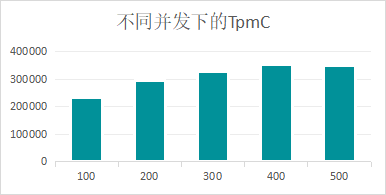
從以上測試數(shù)據(jù)可以看出,隨著測試并發(fā)數(shù)的增加,由于OceanBase服務(wù)器集群資源負(fù)荷增大,事務(wù)平均響應(yīng)時間會逐步增加,但總的TpmC會提高;但當(dāng)測試并發(fā)數(shù)達到或超過臨界點后,OceanBase服務(wù)器集群資源超出最大負(fù)載,總的TpmC反而會下降。
4.1.2. 硬盤測試對比
分別使用SSD硬盤、SATA硬盤做為OceanBase數(shù)據(jù)存儲,100并發(fā)測試結(jié)果如下:
| 硬盤類型 | TpmC Total | 事務(wù)平均響應(yīng)時間(ms) | ||||
|---|---|---|---|---|---|---|
| NEW_ORDER | PAYMENT | ORDER_STATUS | DELIVERY_BG | STOCK_LEVEL | ||
| SSD | 232859 | 40.4 | 18.1 | 8.7 | 108.2 | 6.4 |
| SATA | 228226 | 36.7 | 21.1 | 14.9 | 164.2 | 5.7 |
從上表測試數(shù)據(jù)可以看出,使用SSD硬盤,無論是總的TpmC還是事務(wù)的平均響應(yīng)時間,比起使用SATA盤都會有一定的優(yōu)勢,但優(yōu)勢并不是很明顯。應(yīng)該是因為OceanBase使用LSM Tree存儲架構(gòu)提高了內(nèi)存的使用效率,降低了硬盤讀寫損耗對系統(tǒng)的影響。
4.2. TPC-H測試結(jié)果
4.2.1. 預(yù)熱測試對比
使用SSD硬盤做為OceanBase數(shù)據(jù)存儲,修改tpch.sh腳本,注釋掉預(yù)熱部分代碼,在裝載數(shù)據(jù)成功后第一次執(zhí)行即為非預(yù)熱執(zhí)行,第二次執(zhí)行腳本則為預(yù)熱后執(zhí)行,測試結(jié)果如下:
| 執(zhí)行語句 | 執(zhí)行時間(s) | |
|---|---|---|
| 沒有預(yù)熱 | 有預(yù)熱 | |
| Q1 | 3.72 | 1.70 |
| Q2 | 0.50 | 0.27 |
| Q3 | 2.11 | 1.52 |
| Q4 | 0.51 | 0.35 |
| Q5 | 1.64 | 1.60 |
| Q6 | 0.97 | 0.83 |
| Q7 | 2.21 | 1.76 |
| Q8 | 1.93 | 1.22 |
| Q9 | 3.40 | 3.30 |
| Q10 | 0.47 | 0.39 |
| Q11 | 0.97 | 0.87 |
| Q12 | 1.09 | 1.04 |
| Q13 | 0.80 | 0.77 |
| Q14 | 0.22 | 0.21 |
| Q15 | 0.65 | 0.55 |
| Q16 | 0.46 | 0.46 |
| Q17 | 1.05 | 1.02 |
| Q18 | 1.08 | 1.10 |
| Q19 | 1.15 | 1.10 |
| Q20 | 1.37 | 1.17 |
| Q21 | 2.28 | 2.22 |
| Q22 | 0.56 | 0.60 |
| 總計 | 29.14 | 24.05 |
從上表測試數(shù)據(jù)可以看出,預(yù)熱后TPC-H的測試SQL語句執(zhí)行性能會有一定的提升,是因為SQL在解析與執(zhí)行時命中了執(zhí)行計劃緩存與部分?jǐn)?shù)據(jù)緩存所致。
4.2.2. 硬盤測試對比
分別使用SSD硬盤、SATA硬盤做為OceanBase數(shù)據(jù)存儲,執(zhí)行測試結(jié)果如下:
| 執(zhí)行語句 | 執(zhí)行時間(s) | |||
|---|---|---|---|---|
| 沒有預(yù)熱 | 有預(yù)熱 | |||
| SATA | SSD | SATA | SSD | |
| Q1 | 9.88 | 3.72 | 1.64 | 1.70 |
| Q2 | 2.88 | 0.50 | 0.48 | 0.27 |
| Q3 | 4.73 | 2.11 | 1.14 | 1.52 |
| Q4 | 0.48 | 0.51 | 0.30 | 0.35 |
| Q5 | 2.52 | 1.64 | 1.60 | 1.60 |
| Q6 | 0.89 | 0.97 | 0.78 | 0.83 |
| Q7 | 1.70 | 2.21 | 1.67 | 1.76 |
| Q8 | 2.57 | 1.93 | 2.15 | 1.22 |
| Q9 | 4.61 | 3.40 | 4.48 | 3.30 |
| Q10 | 1.34 | 0.47 | 1.12 | 0.39 |
| Q11 | 1.05 | 0.97 | 0.84 | 0.87 |
| Q12 | 1.08 | 1.09 | 1.01 | 1.04 |
| Q13 | 1.00 | 0.80 | 0.84 | 0.77 |
| Q14 | 0.62 | 0.22 | 0.24 | 0.21 |
| Q15 | 1.32 | 0.65 | 0.58 | 0.55 |
| Q16 | 0.63 | 0.46 | 0.49 | 0.46 |
| Q17 | 5.05 | 1.05 | 4.01 | 1.02 |
| Q18 | 1.01 | 1.08 | 1.00 | 1.10 |
| Q19 | 1.36 | 1.15 | 1.43 | 1.10 |
| Q20 | 5.76 | 1.37 | 4.75 | 1.17 |
| Q21 | 2.28 | 2.22 | 3.72 | 1.70 |
| Q22 | 0.66 | 0.56 | 0.60 | 0.60 |
| 總計 | 54.87 | 29.14 | 34.77 | 24.05 |

從以上測試數(shù)據(jù)可以看出,在沒有預(yù)熱的情況下,使用SSD硬盤比使用SATA硬盤有較大的性能提升;但在有預(yù)熱的情況下,使用SSD硬盤比使用SATA硬盤的性能提升則不是很明顯。應(yīng)該是因為在預(yù)熱情況下TPC-H的測試SQL語句在執(zhí)行時命中了部分?jǐn)?shù)據(jù)緩存,減少了從硬盤讀取數(shù)據(jù)所帶來的損耗。
4.3. 測試小結(jié)
- 通過本次對OceanBase開源版V3.1.1三節(jié)點集群的壓力測試,可以得出以下結(jié)論:按照TPC-C標(biāo)準(zhǔn)進行測試,最高可達355739TpmC,最快可以在24.05秒完成整個TPC-H的測試SQL執(zhí)行,說明了OceanBase開源版V3.1.1在OLTP與OLAP場景下都有不俗的表現(xiàn),并可通過橫向擴展?jié)M足大部分海量數(shù)據(jù)高并發(fā)業(yè)務(wù)場景的性能需求。雖然本次測試TpmC比官方網(wǎng)站上公布的性能測試數(shù)據(jù)要差一些,但可能在服務(wù)器硬件配置以及操作系統(tǒng)內(nèi)核參數(shù)優(yōu)化方面有一定差異,無法直接進行類比。
- 通過SSD硬盤與SATA硬盤對比測試發(fā)現(xiàn),在TPC-C測試下提升效果并不明顯,而在TPC-H測試下,提升效果會好一些。所以如果以O(shè)LTP業(yè)務(wù)為主的話,可以使用SATA硬盤來節(jié)省成本,在預(yù)算充足的情況下,當(dāng)然還是首選SSD硬盤。
