說明:本系列文章僅用于共享我的學習成果,未經過生產系統考驗,對于知識點和一些組件的使用會不定時更新,僅供參考,如有錯誤的地方,歡迎留言共同學習。
本高可用系列測試不說理論知識,如有需要自行百度,因生產環境大多數是內網環境,無法連接互聯網,為模擬生產環境安裝,PostgreSQL高可用測試均采用離線部署。
所需軟件包均以打包上傳百度網盤,如有需要自行下載:https://pan.baidu.com/s/1Tb7GPMvj4kfKEIh8iyvdbA 提取碼:n9w2 文件名:PostgreSQL_HA.tar.gz
第一章: 介紹測試環境
第二章: PostgreSQL + replication 部署
第三章: Etcd 部署和管理
第四章: Patroni 部署和管理
第五章: HAProxy + Keepalived 部署和管理
第六章: 高可用模擬故障測試用例
第七章: Prometheus + Grafana 監控部署
第八章: 高可用管理
第三章: Etcd 部署和管理
Etcd下載地址: https://github.com/etcd-io/etcd 文件名: etcd-v3.5.1-linux-amd64.tar.gz
Etcd官方文檔: https://etcd.io/docs/v3.5/
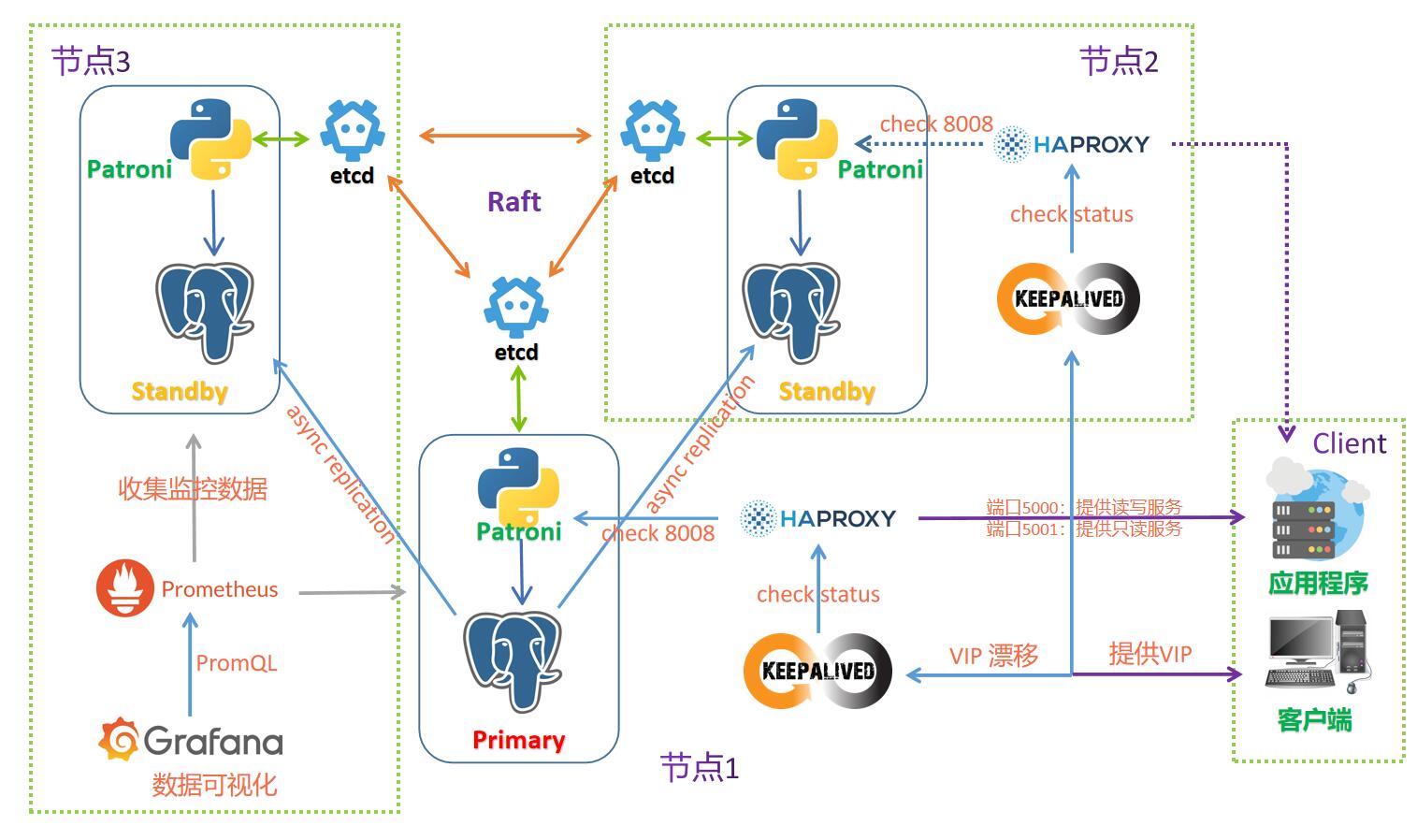
- Etcd 是一款基于 Raft 算法和協議開發的分布式 key-value 數據庫,基于Go語言編寫,Patroni 監控本地的 PostgreSQL 狀態,并將相關信息寫入 Etcd,每個 Patroni 都能讀寫 Etcd 上的 key ,從而獲取外地 PostgreSQL 數據庫信息。
- 建議在 Etcd 集群中擁有奇數個成員,建議三個或五個節點,但是不建議超過7個節點,因為節點多了,寫入性能會受到影響,數據必須在更多機器上復制,如果有條件,最好將節點分布到不同故障區域。
- 一個標準的3節點 etcd 集群,最大容許1個節點故障,一個5節點 etcd 集群,最大容許2個節點故障。
- 由于 etcd 將數據寫入磁盤,因此其性能很大程度上取決于磁盤性能,因此建議使用 SSD。
- etcd最穩定的生產環境是amd64架構的Linux操作系統。
1. 所有節點解壓etcd安裝包并配置環境變量
# 解壓目錄,創建軟鏈接
[root@pgtest1 ~]# tar -zxvf /enmo/soft/etcd-v3.5.1-linux-amd64.tar.gz -C /enmo/app
[root@pgtest1 ~]# mv /enmo/app/etcd-v3.5.1-linux-amd64 /enmo/app/etcd-v3.5.1
[root@pgtest1 ~]# ln -s /enmo/app/etcd-v3.5.1 /enmo/app/etcd
# 配置環境變量
[root@pgtest1 ~]# sed -i "s;:\$PATH:;:/enmo/app/etcd:\$PATH:;g" /etc/profile
[root@pgtest1 ~]# source /etc/profile
2. 所有節點創建 etcd 啟動腳本
# 主節點創建 etcd 啟動腳本
[root@pgtest1 ~]# vi /enmo/app/etcd/start_etcd.sh
/enmo/app/etcd/etcd --data-dir=data.etcd \
  --name etcd_pgtest01 \
  --listen-peer-urls http://192.168.58.10:2380 \
  --listen-client-urls http://192.168.58.10:2379,http://127.0.0.1:2379 \
  --initial-advertise-peer-urls http://192.168.58.10:2380 \
  --advertise-client-urls http://192.168.58.10:2379 \
  --initial-cluster-token etcd-cluster-pgtest \
  --initial-cluster etcd_pgtest01=http://192.168.58.10:2380,etcd_pgtest02=http://192.168.58.11:2380,etcd_pgtest03=http://192.168.58.12:2380 \
  --initial-cluster-state new \
  --enable-v2

# 備節點1創建 etcd 啟動腳本
[root@pgtest2 ~]# vi /enmo/app/etcd/start_etcd.sh
/enmo/app/etcd/etcd --data-dir=data.etcd \
  --name etcd_pgtest02 \
  --listen-peer-urls http://192.168.58.11:2380 \
  --listen-client-urls http://192.168.58.11:2379,http://127.0.0.1:2379 \
  --initial-advertise-peer-urls http://192.168.58.11:2380 \
  --advertise-client-urls http://192.168.58.11:2379 \
  --initial-cluster-token etcd-cluster-pgtest \
  --initial-cluster etcd_pgtest01=http://192.168.58.10:2380,etcd_pgtest02=http://192.168.58.11:2380,etcd_pgtest03=http://192.168.58.12:2380 \
  --initial-cluster-state new \
  --enable-v2

# 備節點2創建 etcd 啟動腳本
[root@pgtest3 ~]# vi /enmo/app/etcd/start_etcd.sh
/enmo/app/etcd/etcd --data-dir=data.etcd \
  --name etcd_pgtest03 \
  --listen-peer-urls http://192.168.58.12:2380 \
  --listen-client-urls http://192.168.58.12:2379,http://127.0.0.1:2379 \
  --initial-advertise-peer-urls http://192.168.58.12:2380 \
  --advertise-client-urls http://192.168.58.12:2379 \
  --initial-cluster-token etcd-cluster-pgtest \
  --initial-cluster etcd_pgtest01=http://192.168.58.10:2380,etcd_pgtest02=http://192.168.58.11:2380,etcd_pgtest03=http://192.168.58.12:2380 \
  --initial-cluster-state new \
  --enable-v2
- –initial-cluster 指定的 URL 是 --initial-advertise-peer-urls。
- 強烈推薦每個集群給予一個唯一的 initial-cluster-token。這樣做之后,etcd 可以為集群生成唯一的集群 ID 和成員 ID,甚至他們有完全一樣的配置。
- etcd 在 listen-client-urls 上接收客戶端訪問,etcd 成員將 advertise-client-urls 指定的 URL 通告給其他成員,代理和客戶端。
- 2379 用于客戶端連接,而 2380 用于伙伴通訊。
3. 所有節點配置etcd啟動腳本可執行權限
# chmod +x /enmo/app/etcd/start_etcd.sh
4. 所有節點配置etcd服務并啟動
# 配置服務
# vi /usr/lib/systemd/system/etcd.service
[Unit]
Description=etcd
After=network.target remote-fs.target nss-lookup.target

[Service]
Type=forking
ExecStart=/bin/bash -c "/enmo/app/etcd/start_etcd.sh >> /enmo/app/etcd/start_etcd.log 2>&1 &"
ExecStop=/usr/bin/killall start_etcd

[Install]
WantedBy=multi-user.target

# 啟動服務
systemctl daemon-reload
systemctl start etcd.service
systemctl enable etcd.service
5. 檢查etcd集群狀態
# 檢查集群節點的狀態
[root@pgtest1 ~]# etcdctl endpoint status --cluster -w table
+---------------------------+------------------+---------+---------+-----------+------------+-----------+------------+--------------------+--------+
|         ENDPOINT          |        ID        | VERSION | DB SIZE | IS LEADER | IS LEARNER | RAFT TERM | RAFT INDEX | RAFT APPLIED INDEX | ERRORS |
+---------------------------+------------------+---------+---------+-----------+------------+-----------+------------+--------------------+--------+
| http://192.168.58.11:2379 | 3f414532c235ce16 |   3.5.1 |   20 kB |     false |      false |         4 |         16 |                 16 |        |
| http://192.168.58.12:2379 | 41cf8a739c2e9b50 |   3.5.1 |   20 kB |     false |      false |         4 |         16 |                 16 |        |
| http://192.168.58.10:2379 | caef4208a95efee8 |   3.5.1 |   25 kB |      true |      false |         4 |         16 |                 16 |        |
+---------------------------+------------------+---------+---------+-----------+------------+-----------+------------+--------------------+--------+
# 列出集群中的所有成員
[root@pgtest1 ~]# etcdctl member list -w table
+------------------+---------+---------------+---------------------------+---------------------------+------------+
|        ID        | STATUS  |     NAME      |        PEER ADDRS         |       CLIENT ADDRS        | IS LEARNER |
+------------------+---------+---------------+---------------------------+---------------------------+------------+
| 3f414532c235ce16 | started | etcd_pgtest02 | http://192.168.58.11:2380 | http://192.168.58.11:2379 |      false |
| 41cf8a739c2e9b50 | started | etcd_pgtest03 | http://192.168.58.12:2380 | http://192.168.58.12:2379 |      false |
| caef4208a95efee8 | started | etcd_pgtest01 | http://192.168.58.10:2380 | http://192.168.58.10:2379 |      false |
+------------------+---------+---------------+---------------------------+---------------------------+------------+
# 檢查集群節點健康狀況
[root@pgtest1 ~]# etcdctl endpoint health --cluster -w table
+---------------------------+--------+-------------+-------+
|         ENDPOINT          | HEALTH |    TOOK     | ERROR |
+---------------------------+--------+-------------+-------+
| http://192.168.58.10:2379 |   true | 21.945446ms |       |
| http://192.168.58.12:2379 |   true | 22.555558ms |       |
| http://192.168.58.11:2379 |   true | 13.002743ms |       |
+---------------------------+--------+-------------+-------+
至此,etcd部署完成,后面是etcd的管理部分,可選擇性閱讀
6. etcd的管理,etcdctl 是一個和 etcd 服務器交互的命令行工具
6.1 查看 etcdctl 的幫助信息
[root@pgtest1 ~]# etcdctl --help
6.2 將領導權轉移到另一個 etcd 集群成員,在leader節點上執行
[root@pgtest1 ~]# etcdctl endpoint status --cluster -w table
+---------------------------+------------------+---------+---------+-----------+------------+-----------+------------+--------------------+--------+
|         ENDPOINT          |        ID        | VERSION | DB SIZE | IS LEADER | IS LEARNER | RAFT TERM | RAFT INDEX | RAFT APPLIED INDEX | ERRORS |
+---------------------------+------------------+---------+---------+-----------+------------+-----------+------------+--------------------+--------+
| http://192.168.58.11:2379 | 3f414532c235ce16 |   3.5.1 |   20 kB |     false |      false |         4 |         16 |                 16 |        |
| http://192.168.58.12:2379 | 41cf8a739c2e9b50 |   3.5.1 |   20 kB |     false |      false |         4 |         16 |                 16 |        |
| http://192.168.58.10:2379 | caef4208a95efee8 |   3.5.1 |   25 kB |      true |      false |         4 |         16 |                 16 |        |
+---------------------------+------------------+---------+---------+-----------+------------+-----------+------------+--------------------+--------+
# 現在 192.168.58.10 是 leader節點,將領導權轉移到192.168.58.11,在leader節點(192.168.58.10)上執行以下命令
[root@pgtest1 ~]# etcdctl move-leader 3f414532c235ce16
Leadership transferred from caef4208a95efee8 to 3f414532c235ce16
[root@pgtest1 ~]# etcdctl endpoint status --cluster -w table
+---------------------------+------------------+---------+---------+-----------+------------+-----------+------------+--------------------+--------+
|         ENDPOINT          |        ID        | VERSION | DB SIZE | IS LEADER | IS LEARNER | RAFT TERM | RAFT INDEX | RAFT APPLIED INDEX | ERRORS |
+---------------------------+------------------+---------+---------+-----------+------------+-----------+------------+--------------------+--------+
| http://192.168.58.11:2379 | 3f414532c235ce16 |   3.5.1 |   20 kB |      true |      false |         5 |         20 |                 20 |        |
| http://192.168.58.12:2379 | 41cf8a739c2e9b50 |   3.5.1 |   20 kB |     false |      false |         5 |         20 |                 20 |        |
| http://192.168.58.10:2379 | caef4208a95efee8 |   3.5.1 |   25 kB |     false |      false |         5 |         20 |                 20 |        |
+---------------------------+------------------+---------+---------+-----------+------------+-----------+------------+--------------------+--------+
6.3 保存數據庫快照(數據庫備份),只在其中一個節點執行
[root@pgtest1 ~]# etcdctl snapshot save etcd_bak.db
{"level":"info","ts":1635648427.3933637,"caller":"snapshot/v3_snapshot.go:68","msg":"created temporary db file","path":"etcd_bak.db.part"}
{"level":"info","ts":1635648427.3941739,"logger":"client","caller":"v3/maintenance.go:211","msg":"opened snapshot stream; downloading"}
{"level":"info","ts":1635648427.3941944,"caller":"snapshot/v3_snapshot.go:76","msg":"fetching snapshot","endpoint":"127.0.0.1:2379"}
{"level":"info","ts":1635648427.3956425,"logger":"client","caller":"v3/maintenance.go:219","msg":"completed snapshot read; closing"}
{"level":"info","ts":1635648427.396033,"caller":"snapshot/v3_snapshot.go:91","msg":"fetched snapshot","endpoint":"127.0.0.1:2379","size":"25 kB","took":"now"}
{"level":"info","ts":1635648427.3960974,"caller":"snapshot/v3_snapshot.go:100","msg":"saved","path":"etcd_bak.db"}
Snapshot saved at etcd_bak.db
# 查看快照信息
[root@pgtest1 ~]# etcdctl snapshot status etcd_bak.db -w table
+----------+----------+------------+------------+
|   HASH   | REVISION | TOTAL KEYS | TOTAL SIZE |
+----------+----------+------------+------------+
| 230fea56 |        0 |          8 |      25 kB |
+----------+----------+------------+------------+
6.4 修改現有成員信息
1. 修改 advertise client URLs
修改 etcd 的啟動腳本 /enmo/app/etcd/start_etcd.sh,將參數–advertise-client-urls更新為需要修改的信息后重啟這個成員的etcd(systemctl restart etcd.service)。
重新后的成員將自行發布更新后的URL。錯誤更新的 client URL 將不會影響 etcd 集群的健康。
2. 修改 advertise peer URLs
要修改現有成員的 advertise peer URLs, 首先通過(etcdctl member update)命令更新它然后再重啟這個成員。
執行命令(etcdctl member update)是因為更新 peer URL 修改了集群范圍配置并能影響 etcd 集群的健康。
首先,我們需要找到目標成員的ID。使用 etcdctl 列出所有成員:
[root@pgtest1 ~]# etcdctl member list -w table
+------------------+---------+---------------+---------------------------+---------------------------+------------+
|        ID        | STATUS  |     NAME      |        PEER ADDRS         |       CLIENT ADDRS        | IS LEARNER |
+------------------+---------+---------------+---------------------------+---------------------------+------------+
| 3f414532c235ce16 | started | etcd_pgtest02 | http://192.168.58.11:2380 | http://192.168.58.11:2379 |      false |
| 41cf8a739c2e9b50 | started | etcd_pgtest03 | http://192.168.58.12:2380 | http://192.168.58.12:2379 |      false |
| caef4208a95efee8 | started | etcd_pgtest01 | http://192.168.58.10:2380 | http://192.168.58.10:2379 |      false |
+------------------+---------+---------------+---------------------------+---------------------------+------------+
在這個例子中,讓我們 更新 caef4208a95efee8 成員ID并修改它的 peerURLs 值為 http://10.0.1.10:2380。
[root@pgtest1 ~]# etcdctl member update caef4208a95efee8 http://10.0.1.10:2380
Updated member with ID a8266ecf031671f3 in cluster
最后修改 etcd 的啟動腳本 /enmo/app/etcd/start_etcd.sh,將參數更新為需要修改的信息后重啟這個成員的etcd(systemctl restart etcd.service)。
6.5 刪除成員
假設我們要刪除的成員ID是 caef4208a95efee8.
[root@pgtest1 ~]# etcdctl member remove caef4208a95efee8
Removed member caef4208a95efee8 from cluster
可以安全的移除 leader,當然在新 leader 被選舉時集群將不活動(inactive)。這個持續時間通常是選舉超時時間加投票過程。
6.6 添加新成員
添加成員的過程有兩個步驟:
- 通過 etcdctl member add 命令添加新成員到集群。
- 使用新的成員配置啟動新成員,包括更新后的成員列表(以前的成員加新成員)
使用 etcdctl 指定 name 和 advertised peer URLs 來添加新的成員到集群:
[root@pgtest1 ~]# etcdctl member add etcd_pgtest04 http://192.168.58.13:2380
added member 9bf1b35fc7761a23 to cluster
ETCD_NAME="etcd_pgtest04"
ETCD_INITIAL_CLUSTER="etcd_pgtest01=http://192.168.58.10:2380,etcd_pgtest02=http://192.168.58.11:2380,etcd_pgtest03=http://192.168.58.12:2380,etcd_pgtest04=http://192.168.58.13:2380 "
ETCD_INITIAL_CLUSTER_STATE=existing
警告: 如果新成員啟動的磁盤空間中存在舊的數據目錄,需要在啟動前刪除舊的數據目錄(–data-dir 默認${name}.etcd)
新成員創建啟動腳本
[root@pgtest4 ~]# vi /enmo/app/etcd/start_etcd.sh
/enmo/app/etcd/etcd --data-dir=data.etcd \
  --name etcd_pgtest04 \
  --listen-peer-urls http://192.168.58.13:2380  \
  --listen-client-urls http://10.0.1.13:2379,http://127.0.0.1:2379 \
  --initial-advertise-peer-urls http://192.168.58.13:2380  \
  --advertise-client-urls http://10.0.1.13:2379  \
  --initial-cluster-token etcd-cluster-pgtest \
  --initial-cluster etcd_pgtest01=http://192.168.58.10:2380,etcd_pgtest02=http://192.168.58.11:2380,etcd_pgtest03=http://192.168.58.12:2380,etcd_pgtest04=http://192.168.58.13:2380 \
  --initial-cluster-state existing \
  --enable-v2
注意設置 initial-cluster-state 為 existing
創建服務文件,啟動服務
[root@pgtest4 ~]# systemctl start etcd.service
新成員將作為集群的一部分運行并立即開始趕上集群的其他成員。
添加新成員的最佳實踐是一次配置單個成員并在添加更多新成員前驗證它正確啟動。這個逐步的方式非常重要,因為如果最新添加的成員沒有正確配置(例如 peer URL 不正確),集群會丟失法定人數。發生法定人數丟失是因為最新加入的成員被法定人數計數,即使這個成員對其他已經存在的成員是無法訪問的。同樣法定人數丟失可能發生在有連接問題或者操作問題時。
6.5 其他參考官方文檔
Etcd官方文檔: https://etcd.io/docs/v3.5/
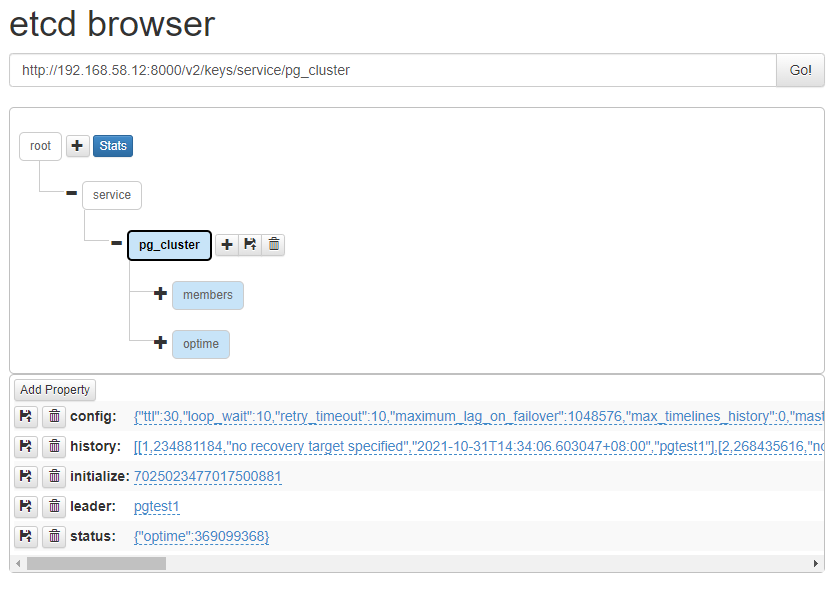
7. etcd-browser WEB可視化界面
下載地址: https://github.com/henszey/etcd-browser
要啟動 etcd-browser,還需要下載安裝 nodejs,下載地址: https://nodejs.org/zh-cn/download/
# 解壓etcd-browser的安裝包
[root@pgtest3 ~]# unzip /enmo/soft/etcd-browser-master.zip -d /enmo/app/etcd
# 解壓nodejs的安裝包
[root@pgtest3 ~]# tar -xvf /enmo/soft/node-v16.13.0-linux-x64.tar.xz -C /enmo/app/etcd
[root@pgtest3 ~]# mv /enmo/app/etcd/node-v16.13.0-linux-x64 /enmo/app/etcd/nodejs
# 修改etcd-browser的配置文件
[root@pgtest3 ~]# vi /enmo/app/etcd/etcd-browser-master/server.js
var etcdHost = process.env.ETCD_HOST || '192.168.58.12';
var etcdPort = process.env.ETCD_PORT || 2379;
var serverPort = process.env.SERVER_PORT || 8000;
# 啟動etcd-browser
[root@pgtest3 ~]# cd /enmo/app/etcd/etcd-browser-master
[root@pgtest3 etcd-browser-master]# /enmo/app/etcd/nodejs/bin/node server.js
proxy /api requests to etcd on 192.168.58.12:2379
etc-browser listening on port 8000
谷歌瀏覽器訪問 http://192.168.58.12:8000/